Showing posts with label Music making. Show all posts

Saturday, April 4, 2015

Cheaper Music Making - Part 6 Geeks only need apply


When I last posted on the Linux music making effort, I was wrestling with Crouton, latency and several Linux based DAWs. Its been awhile and I've done quite a bit of experimenting and hacking since then. With all of this effort, I'm drawing a few conclusions that I'd like to share:
  1. While cheap in terms of hardware, making music on Linux is significantly more difficult than on a commercial platform. The setup for hardware and software solutions are overwhelming and in varying degrees of maturity - it remains a domain for tinkerers and hackers.
  2. Crouton, while tremendous on the Chromebook has a "wall" when it comes to latency. Since it shares its kernel with the chroots and its kernel is not optimized for low latency (such as hooking up MIDI keyboards), there is only so far it can take you. I find it usable, but just barely.
  3. It is a lot of fun hacking around getting all of this to work - which is why I kept going on this over the past month. My definition of "fun" might not fit yours though! 
  4. If you are really just looking for cheap hardware for your music making, you might do better to focus on second hand hardware and use cheap and/or free options. Many of the software packages for music making on Linux have cross-platform options.
With all that said, I decided to try yet another option on the chromebook hardware - a full linux distribution that dual boots along with Chrome OS. By going with a full distro, I can tweak the settings and kernel as needed to get the desired performance (in theory at least). I already replaced the SSD in the chromebook with a 128GB option, so I decided to install an independent 32GB Linux partition.

Any kind of hardware configuration in Linux requires a detailed knowledge of the touchpad, music cards, screens, etc. Instead of going through all of that work, I did take a shortcut and used pre-configured Linux installs for my Acer C720 available at Distroshare. This site has many Linux options pre-made for a few Acer chromebooks - the C720 and C740 for the most part. 

If you wish to go this route and create a dual-booting Linux, I cannot emphasize enough the need for backups! Chrome OS is very easy to recover, but if you have files on your local machine in your Downloads folder or you have existing crouton setups, you need to back these up before trying to partition and install a full distro. The instructions on Distroshare, sort of assume you are setting up Linux for the first time and don't make it clear that the process is destructive! It will cause your Chromebook to reset itself. Also, many installers are looking to completely replace Chrome OS. In my case I wanted to be able to boot either OS so you have to look for the instructions for Dual-boot and follow them carefully. If you make a mistake (I made several!), be prepared to do a full recovery of your Chrome OS - not that hard, but takes about 20 minutes or so each time. I've slightly altered the instructions from the site. Please note that step 1 will cause the partition to be created and your chromebook will recover itself - so have your backups first! 
  1. Go into a terminal window on your Chromebook (Ctrl-Alt-T), type shell and download and run the Chrubuntu script to partition the disk: curl -L -O http://goo.gl/s9ryd; sudo bash s9ryd. At this point, Chrome will reboot and repair itself. Format the filesystem on /dev/sda7 while you are in the ChromeOS shell, which is where Linux is going to. To do that, type sudo mkfs.ext4 /dev/sda7
  2. Reboot and boot into legacy mode (Ctl-L) with the usb stick with this distro on it.
  3. Run the installer continue on until you reach the "Installation Type" section.
  4. Choose: "Something else" or "manual install"
  5. Select /dev/sda7
  6. Select Change. 
  7. In the popup window, configure it so the filesystem matches what you formated it as in step #3 and the mount point is "/". Do NOT select the format checkbox. Then press ok.
  8. A new popup might show up with the title: "Write previous changes to disk and continue?" Select "Go Back" - Do not write the changes to disk or you will have to recover. 
  9. Select "Install Now"
  10. A new pop up will show up with the title "Do you want to return to the partitioning menu?" Select "Continue"
  11. Another popup: "Do you want to return to the partitioner?" Select "Continue"
  12. Another popup: "Continue with installation? No partition table changes ..." Select "Continue"
Once all of that completes and you reboot (pressing Ctrl-L when the splash screen shows), you should be in a full independent Linux on your laptop. This allows you to alter any of the etc files, create custom kernels etc. I'll get into those steps later. 


Sunday, January 25, 2015

Ethical use of Korg Module and another birthday

This month I celebrated another birthday and with a birthday in January, I often take a reflective look on my life. I combine New Year resolutions with another year on earth and see how my life is affecting the world I live in.

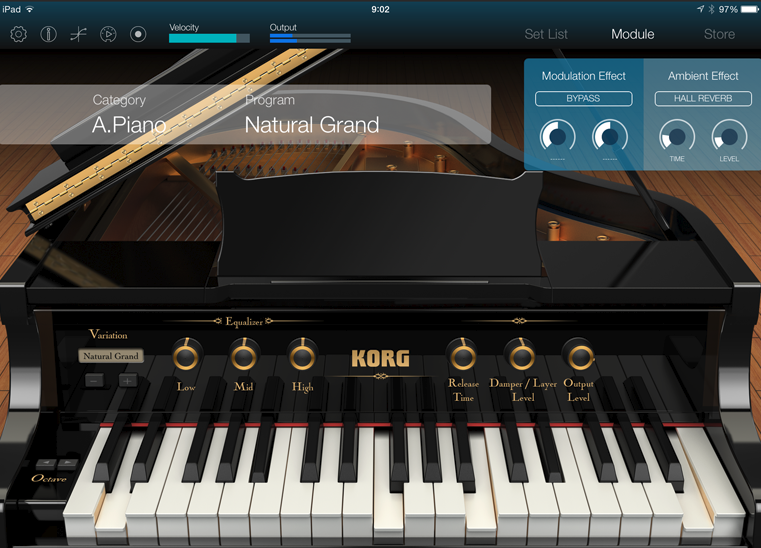
Loving music as I do, I also try to be ethical and cause no harm to the world other than aural abuse (I suffer for my music so its only fair that my listeners have their turn!). Very recently I downloaded Korg Module and the Synthology Ivory piano add-ons without really thinking of the implications. Spoiler alert - the Synthology Ivory pianos sound incredible but that is not what has me soul searching and this is not to be a review nor an endorsement - far from it my friends!

Giving it a little thought, I looked into the Synthology pianos. These are virtual pianos, of course with rich sampling and sounds. These can be played by external keyboards but also via virtual keys which are pretty small in Module. It stands to reason, that these small virtual keyboards are made of virtual ivory! I realize most of you probably knew that being the astute musicians that you are, but to me this was a revelation.

Taking my thought processes further, it stands to reason that virtual ivory must come from virtual tusks which in turn come from virtual elephants! In all my web browsing and computer usage, I don't recall seeing more than a very few virtual elephants. "Why might this be?", I asked myself and came to the same conclusion that you no doubt have also reached - they are nearly extinct!

In fact, now that I think of it, I have read of domain poaching related to the internet and this is probably where the virtual ivory comes from. I think I'm going to have to either come to terms with the ethical implications of using Module or delete it from my iPad.

In all honesty, I have been accused of tree-huggery in my past. I have had my shares of embarrassments. My Nauga preserve in the 1980s went nowhere. Likewise my clay pigeon preserve. Added to the list, my attempt to revive the North American Faux (they are extremely popular for their fur and for leather, a peculiar animal that makes no noise - what does the faux say?) and don't even ask about my mule-breeding experiment.

In any event, I may have to avoid Synthology despite the sound quality or compromise my personal code of ethics. Thanks for reading.

Saturday, November 23, 2013

Art, Science, Neither or Both?


If you are one of the very few that follow my blogging or music, you probably know that one of my favorite tools is Noatikl, which is essentially a super-sequencer or music composition tool.

Recently on a few pieces I received some nice feedback on my "playing" or the performance aspects of generative pieces and that got me thinking a bit on how to take that. All of the pieces that I put together and release are usually 100% MIDI or close to that which means I am using computer generated sound in one form or another.

If my pieces are synthesizer based, I am using software synths as plugins on the iPad or on my desktop. If my pieces use "traditional" instruments, I am resorting to samples played on either a keyboard or other creative MIDI input devices using Logic or Kontakt on the desktop or any number of samplers/Romplers on the iPad.

Some of my pieces are performed track by track with MIDI keyboards and then edited (for mistakes), tweaked for sound and/or timing issues and then combined. This is a bit closer to traditional performing in a studio environment. I NEVER perform anything live.

Other pieces, such as those from Noatikl are more akin to composing. I program each voice with rhythmic patters, keys to use, rests, probabilities, instructions for harmony, etc and more or less "turn them loose". This is certainly not performing in the traditional sense but is setting music into motion and then tweaking the program until it sounds "done" to me.

One aspect very close to performing is when I use the EWI (Electronic Wind instrument) in my pieces. This device requires fingering the keys, blowing into the mouthpiece and translates all of this into MIDI events that are passed into a (usually) sample-based instrument. This can be a flute, trumpet, sax or even synthesizer - all modulated and controlled with my breath. Despite the "disconnect" from an analog wind instrument, it reacts and acts almost exactly the same.

So with all that, is this just a shortcut to music? Is this just winding up a music box or turning on a player piano? I think with all the setup and parameters, its more than that but also its not quite live either - even if done in one take.

I think music has evolved further and further away from direct creation over the years and that computers are just one more step along the way.

From the initial singing or chanting, we have evolved more complicated ways of making sounds throughout history. First with pipes and blowing or percussion with sticks, then strings or harps. These evolved into mechanical versions - harpsichords, pianos. Is the musician still performing when "just" pushing keys that turn levers that make hammers strike strings? What happens when it is electronic as in an organ? Sample based as started with rotating drums or tapes?

Overall I think studio work is a mix of composing and performance and the tools used don't really define that. So when my beautiful violin part is merely a mutating rhythm based on:

<100 R 30 -30 60 60>

it is still in some way a musical composition. I get to play "George Martin" to the performers in these cases and hopefully come up with something palatable!

Here are a few pieces "generated" more or less in that fashion - one from the iPad and the other from the desktop: