Showing posts with label Logic X. Show all posts

Saturday, January 3, 2015

Twiddling the littleBits Korg


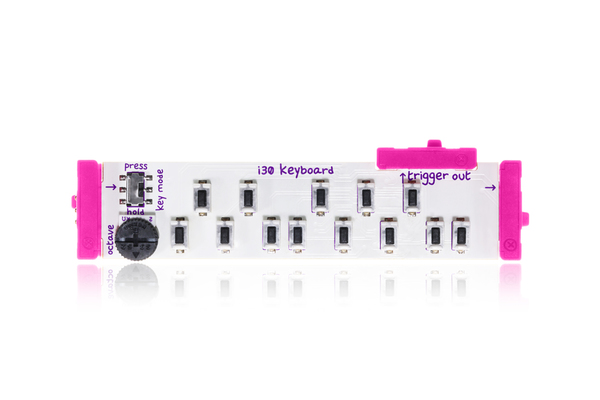
Since my first playing around with the littleBits, I've got the arduino configured so I can use my Akai MPK mini keyboard to control the littleBits synth. Hardware synths are new to me and one challenge is tuning the oscillators! They do have some drift and interesting interactions together. The MIDI program for the arduino has built into it some nice features to mimic an LFO by modulating the pitch with CC1 events and it supports portamento as well as pitch bending. This is much better than using the provided "mini keyboard" which basically is an array of switches:
With the arduino setup, I also can use my iPad to control pitches with any of its MIDI apps which I'll be doing more of as I go on. The piece above was with just the MPK mini on 2 tracks - one bass looped and the other sort a distorted guitar. The distortion interestingly enough was all from the modules in the little bits - no post processing bit crushers or digital noise added. The synth setup for this piece, I call a "mess-20" since it is sort of the MS-20 Korg configuration. 2 analog oscillators, an envelope into the filter that is triggered by note-ons and a simple delay module. 

The post processing was limited to some EQ, compression and a stereo-spread module to give the mono synth some sense of space. 

So after a few more days of tweaking, I still thing this is an incredible modular setup for very little money! I did add some modules to the bass Synth kit - specifically some wires, mixers, splitters and an additional envelope and oscillator. It is important to remember that these are Korg modules and it IS a mono synth, so no polyphony or stereo in the hardware itself is supported. Likewise, these modules are not inherently velocity sensitive, so any volume adjustments are limited to playing with the volume know (or much easier) done with automation on the track post recording. 

I usually record the audio into Logic and there I can add space with the stereo spreader or manipulate the recorded audio in any other ways. I'm sure this is old news to you audio gurus but for a  MIDI guy like me, there is a learning curve here. It took me awhile to get the levels right for recording and as of now I am still going through the iMac mic-in port which probably is not the cleanest. 

For patch preset saving I resort to the camera on my phone so I can remember the convoluted lego-like layouts of my synth modules for future use :). 


Saturday, December 20, 2014

Hybrid iPad Music


Making music on the iPad usually requires just a bit of patience with inter-app audio or audio sharing, communicating and crashing. That is just the "state of the art" at the moment with iPad music creation. I make a great deal of music on my tablet but to do so requires unique workflows, frequent saving and a bit of luck!

Recently while experimenting with the excellent MIDI instrument, Gestrument, I rapidly found my iPad misbehaving in various ways and decided a compromise was in order. Using my iConnect MIDI 2, I can send and receive either audio or MIDI to and from my iPad. I decided that I wanted to create a piece using the Gestrument instrument but with desktop samples (which are STILL head and shoulders above any sampled instruments on the iPad).

Gestrument is very expressive and with multi-touch gestures will send MIDI notes, velocities and varied pitches, etc. It can control multiple MIDI channels all at once and is capable of making some very unique sounds.

I wanted to make a jazz piece and use some Native Instruments Kontakt samples. I chose the MM Bass and the MKII electric piano for the background of the piece (both part of the Komplete bundle from Native Instruments). I wanted to use gestrument to send chords which is not something it does easily. Rather than wrestle with multiple voices on Gestrument, I sent one instrument into a "Track Stack" in Logic X and then sent the notes to the Bass on one track, a MIDI chorded piano on a second and a syncopated arpeggiated piano on the 3rd track. This set up the basic bass and piano rhythms in the piece very nicely. By playing the notes and articulations on the iPad, I recorded the resulting MIDI into the track stack which played back on the 3 sub-tracks in Logic.

For jazz drums, I find the drum tracks a bit lacking in Logic, so I resorted to some excellent Jazz looped drums.

Once this was all done, I set up a few saxophone tracks and played various rhythms in the same key (Eb minor blues) as the rhythm and then mixed, tweaked and mastered on Logic from there on out.

Say what you will about Cubasis or Auris, Logic X is still worlds easier to work with multiple MIDI channels with or without the iPad.


Wednesday, October 16, 2013

Bringing it all together


I haven't posted for awhile but have been busy with many new synths on the iPad and a few new songs on Logic X. One thing I've been looking for is better ways to integrate my iPad with my desktop and the two products above are recent additions to my MIDI gear list. 

THe iConnectMIDI2 solves the problem with wireless latency between the iPad and my iMac as well as providing a clean audio interface that bypasses the noisy headphone jack on the iPad. This device provides bi-directional audio over USB as well and MIDI over USB between the iPad and my iMac running Logic Pro X. The device connects to the iPad via the 30 pin connector and if you add a power supply to it (sadly an extra purchase), it will also charge the iPad while connected.

They don't have the "new' iPad connector cable as of yet so if you have a newer iPad, you will have to use the 30 pin adapter but this is a fantastic addition to my music gear. With this connector, I can use my iPad as a MIDI device or I can send audio from my iPad synths directly into Logic. Even better, I can use my keyboards attached to my iMac with my iPad without rewiring things.

Another great addition to my gear is the incredible QuNexus keyboard from Keith McMillan Instruments. This diminutive keyboard is extremely durable (there are videos dropping it, running over it with a car, etc. etc) and provides great touch sensitivity, polyphonic aftertouch, tilt modulation settable for all keys or individual keys and is tiny to boot and powered by USB (even on the iPad). 

I can't tell you how cool this sounds compared to my old Akai MPK Mini. You do have to use it a bit differently than a traditional keyboard but you can map any modulation to almost any parameter. It works very well with Logic X and also with the iPad. By using this with the iConnectMIDI2, I can connect it to my iMac and when the iPad is connected to the iConnectMIDI2, I can use it with either device without unhooking. This is perfect for me! 

On added bonus, I left my Akai MPK Mini hooked up as well and can use both concurrently. I can set my Akai to a lower octave and the QuNexus to a higher one which gives me 50 keys instead of the scant 25 keys that each keyboard provides. 

I'll be using these quite a bit in future songs and it is great to finally have a clean noise-free interface for my iPad.